Project Introduction
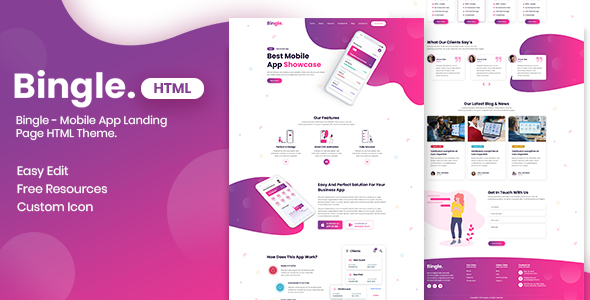
Bingle is a static landing page HTML template designed for mobile apps, featuring a pink color scheme. It is suitable for showcasing mobile application product introductions, feature highlights, user reviews, blog posts, and other scenarios. The template is built with pure HTML/CSS/JS and can be used directly without any build tools.
Tech Stack
- HTML5 + CSS3 (Static pages)
- Bootstrap 5 (Responsive layout framework)
- FontAwesome 6 (Icon library)
- jQuery (Document page interactions)
- Animate.css (Page animation effects)
Project Structure
binglehtml-10/bingle-html/
├── Documentation/               # Theme documentation
│   ├── Documentation/index.html
│   └── html/                    # Example pages (included with docs)
└── html/
    └── html/                    # Actual template files
        ├── index.html           # Homepage (App showcase page)
        ├── blog.html            # Blog list page
        ├── blog-details.html    # Blog detail page
        ├── css/                  # Stylesheet files
        ├── img/                  # Image assets
        └── fontawesome/          # Icon fonts
Core File Description
html/html/index.html— App landing page homepage, includes Hero section, features, screenshot showcase, and other complete blockshtml/html/blog.html— News/blog list page with breadcrumb navigationhtml/html/blog-details.html— Single blog detail pagehtml/html/css/style.css— Main theme stylesheethtml/html/css/responsive.css— Responsive adaptation styleshtml/html/css/bootstrap.min.css— Bootstrap framework styles
Quick Start
This project is a pure static template with no dependencies required. Simply open the following file in your browser to preview:
binglehtml-10/bingle-html/html/html/index.html
For local server viewing, use any static server tool (e.g., npx serve) pointing to the binglehtml-10/bingle-html/html/html/ directory.
Usage Suggestions
Extract files from the html/html/ directory for use; other directories contain duplicate copies or documentation. Template image asset paths use relative paths, so it is recommended to keep the img/, css/, and fontawesome/ directory structure unchanged to ensure styles and icons load correctly.
