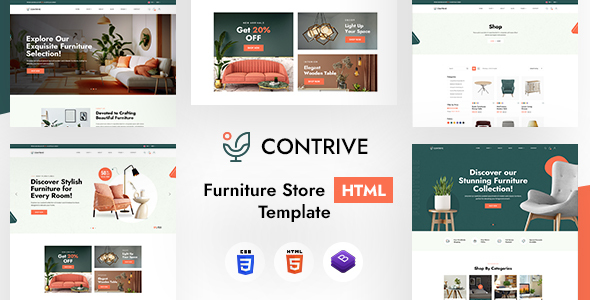
Project Overview
Contrive is a Bootstrap-based multi-page retail e-commerce HTML template that provides complete page layouts including homepage, product pages, shopping cart, checkout, blog, and more. It is suitable for quickly building e-commerce websites or landing pages. The template uses a coral orange color scheme and includes interactive effects such as carousels and scroll animations.
Tech Stack
- Bootstrap 5.x (responsive framework)
- Owl Carousel 2.3.4 (carousel component)
- AOS (scroll animation library)
- Font Awesome 6.5 (icons)
- Google Fonts: Archivo, Jost (typography)
- PHP (only contact-form.php handles the contact form)
Project Structure
text
contrivehtml-10/
└── contrive/
    ├── index.html          # Homepage (Homepage Layout 1)
    ├── index1.html         # Homepage Layout 2
    ├── index2.html         # Homepage Layout 3
    ├── shop.html           # Product List
    ├── product-detail.html # Product Detail
    ├── cart.html           # Shopping Cart
    ├── checkout.html       # Checkout Page
    ├── contact.html        # Contact Page
    ├── contact-form.php    # Contact Form Processing
    ├── blog.html           # Blog List
    ├── single-blog.html    # Blog Detail
    ├── about.html          # About Us
    ├── team.html           # Team Members
    ├── faq.html            # Frequently Asked Questions
    ├── 404.html            # 404 Page
    └── assets/
        ├── bootstrap/      # Bootstrap CSS
        ├── css/            # Theme Styles
        └── images/         # Image Assets
Key File Descriptions
contrive/index.html— Main homepage template, includes top promo bar, navigation, banner, and various modulescontrive/assets/css/style.css— Global stylesheet, defines color variables and typography standardscontrive/assets/css/responsive.css— Responsive adaptation stylescontrive/contact-form.php— Backend contact form processing script, sends emails to a specified addresscontrive/shop.html— Product list page templatecontrive/product-detail.html— Product detail page template
Quick Start
- Open
contrive/index.htmldirectly in a browser to preview - To use the contact form, you need to set up a PHP environment (e.g., XAMPP, php -S) and point the form submission to
contact-form.php - You can copy
index.htmlas a new page and modify the content as needed
Usage Recommendations
- Replace placeholder images in
assets/images/with actual assets - For backend functionality (shopping cart, orders), develop your own or integrate with an e-commerce backend service
- The color theme is controlled by CSS variables in
style.css; you can uniformly modify values like--e-global-color-accentto change colors
