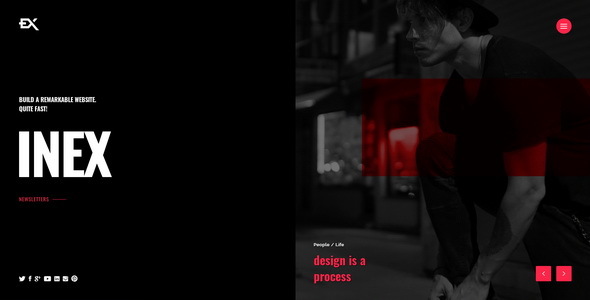
Project Introduction
Inex is a creative "Coming Soon" page template, suitable for pre-launch announcement pages. It offers multiple homepage variants, including Hero slider, YouTube/Vimeo video backgrounds, single image with typewriter effect, and more. Built-in contact form and MailChimp subscription functionality.
Tech Stack
- Static HTML/CSS/JavaScript
- jQuery (frontend interactions)
- Swiper/Slick (carousel components)
- PHP (backend processing for contact form and subscription form)
Project Structure
text
inexhtml-10/
├── Inex-v1-0-Documentation/      # Official documentation
│   └── index.html
└── Inex-v1-0-Template/           # Template main directory
    ├── index-*.html              # 6 homepage variants
    ├── contact.php               # Contact form processing
    ├── subscribe.php             # MailChimp subscription processing
    ├── css/
    │   ├── style.css             # Main stylesheet
    │   └── plugins.css           # Plugin styles
    └── js/
        ├── inex.js               # Main script
        └── plugins.js            # Plugin scripts
Core File Description
index-HERO-SLIDER.html— Hero slider style homepageindex-YOUTUBE-VIDEO.html— Full-screen YouTube video background homepageindex-VIMEO-VIDEO.html— Full-screen Vimeo video background homepagecss/style.css— Main stylesheet defining layout, colors, animationsjs/inex.js— Page interaction logic and effect implementationcontact.php— Contact form data processing (requires PHP environment)
Quick Start
- Static preview only: Open
index-*.htmlfiles directly by double-clicking, or use a local server (e.g.,npx serve) to preview in a browser - Enable form functionality: Deploy the template directory to a PHP-supported web server, update
$myemailincontact.phpwith your actual email, and configure the API Key and List ID insubscribe.php
Usage Suggestions
- Choose the homepage variant (6 options available) that best fits your project style, then replace background images and copy
- For video background pages, ensure the video file or YouTube/Vimeo link is accessible
- Subscription functionality relies on the MailChimp API; please register in advance and obtain your API Key
