Project Overview
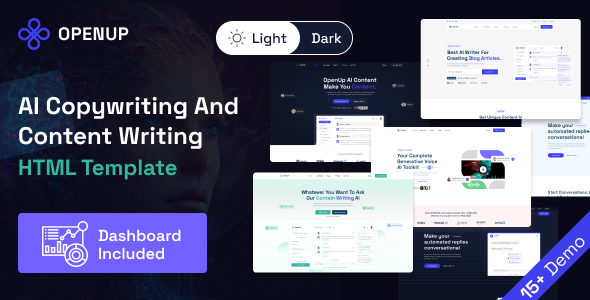
OpenUp is a collection of HTML templates designed for AI content creation scenarios, including landing pages, user dashboards, chatbots, image generation, voice synthesis, and other page types. It is suitable for quickly building AI copywriting or AI application product showcase sites.
Tech Stack
- HTML5 + CSS3 (Static Pages)
- jQuery (Interaction Logic)
- Bootstrap 4 (Responsive Layout Framework)
- SCSS (Style Preprocessor)
- Font Awesome 6 Pro (Icon Library)
- Google Fonts (Space Grotesk / Roboto, etc.)
- Swiper.js (Carousel Component)
Project Structure
text
openup-ai-content-writing-applications-landing-page-template/
├── documentation/           # Product Documentation Pages
│   ├── index.html
│   └── assets/
│       ├── css/main.css
│       ├── js/main.js
│       ├── fonts/
│       └── images/
├── openup-dashboard/        # User Dashboard
│   ├── index.html
│   ├── chatbot.html
│   ├── voicegenerator.html
│   ├── image-generator.html
│   └── assets/
│       ├── css/style.css
│       ├── scss/style.scss
│       ├── js/main.js
│       └── fonts/
└── openup-html/             # Landing Page Collection
    ├── dark/                # Dark Theme Pages
    │   ├── index.html
    │   ├── index-dark.html
    │   └── pricing.html
    └── openup-rtl/          # RTL Layout Version
        └── index.html
Key File Description
openup-html/index.html— Main landing page entry, showcasing AI copywriting servicesopenup-dashboard/index.html— User dashboard homepage, includes sidebar and content areaopenup-dashboard/assets/css/style.css— Dashboard main styles, defines theme color--color-primaryand fontsopenup-dashboard/assets/js/main.js— Dashboard interaction logic, includes audio playback, sidebar collapse, etc.documentation/index.html— Product documentation site, includes navigation search and content anchor jumpsopenup-html/openup-rtl/index.html— RTL layout demo page, supports right-to-left typography for Arabic, etc.
Quick Start
This is a purely static project. Simply open the corresponding HTML file directly in your browser to preview:
- Landing Page:
openup-html/openup-rtl/index.html - Dashboard:
openup-dashboard/index.html - Documentation:
documentation/index.html
For a complete interactive experience, it is recommended to use a local server (e.g., npx serve .) to open the pages.
Usage Suggestions
- To replace brand colors, directly modify the CSS variables in the
:rootsection at the top of the CSS file (e.g.,--color-primary) to batch update the site's color scheme - Pages rely on external CDN resources (e.g., Google Fonts, jQuery). Ensure network accessibility when deploying
