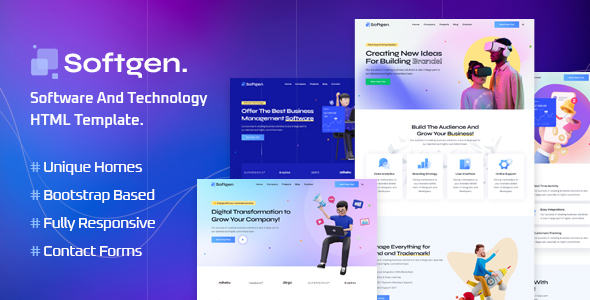
Project Overview
Softgen is a set of HTML5 multi-page templates for software and technology companies, developed by ThemeEaster. It includes complete pages such as homepage, case studies, blog, team, and more, along with PHP backend scripts for contact forms and Mailchimp subscriptions. It is suitable for quickly building corporate websites or product showcase sites.
Tech Stack
- HTML5 + CSS3 (main styles + common styles)
- Bootstrap 5 (responsive layout framework)
- Vanilla JavaScript (interactive animations, sidebar, etc.)
- PHP (contact form, team form submission; Mailchimp subscription interface)
Project Structure
text
softgenhtml-10/Master Files/
├── Documentation/          # Template usage documentation
│   └── index.html
└── html/                   # Official template files
    ├── assets/             # Static resources: styles, scripts, images, etc.
    ├── php/
    │   ├── contact.php     # Contact form backend
    │   ├── mailchimp-subscribe.php  # Email subscription backend
    │   └── team-contact.php  # Team form backend
    ├── index.html          # Homepage (Marketing Startup)
    ├── index-2.html        # Homepage variant (App Promotion)
    ├── index-3.html        # Homepage variant (Software SaaS)
    ├── index-4.html        # Homepage variant (IT Solutions)
    ├── about.html          # About Us
    ├── services.html       # Services List
    ├── service-details.html
    ├── projects.html       # Project Case Studies
    ├── project-details.html
    ├── blog-grid.html      # Blog (Grid)
    ├── blog-classic.html   # Blog (Classic)
    ├── blog-details.html
    ├── team.html           # Team Members
    ├── team-details.html
    ├── pricing.html        # Pricing Plans
    ├── testimonial.html    # Client Testimonials
    ├── faqs.html           # Frequently Asked Questions
    ├── contact.html        # Contact Us
    └── 404.html            # Error Page
Core File Descriptions
html/index.html— Main homepage entry, includes navigation, Hero section, services, case studies, team, and other complete structureshtml/assets/css/main.css— Theme core stylesheet, controls overall visual presentationhtml/php/contact.php— Contact page form processing, includes validation and email sending for name, email, phone, and message fieldshtml/php/mailchimp-subscribe.php— Mailchimp API subscription interface wrapperhtml/php/team-contact.php— Team detail page form processing logicDocumentation/index.html— Official usage documentation, includes HTML structure, CSS explanations, and JS introduction
Quick Start
bash
# Method 1: Open directly in browser
open softgenhtml-10/Master\ Files/html/index.html

# Method 2: Local HTTP server (recommended for proper form submission testing)
cd softgenhtml-10/Master\ Files/html
php -S localhost:8000
# Visit http://localhost:8000
Usage Recommendations
Before deployment, replace the recipient email contact@yourdomain.com in php/contact.php and php/team-contact.php with your actual address, and replace the Mailchimp API Key with your real key. Otherwise, the form functionality will not work properly.
